
If you've found this article, you've likely found some trouble in getting badges, setting high scores, or buying Kreds. You might have seen this puzzle piece in your nav bar:

As Chrome begins deprecating Flash, it is up to users to re-enable Flash. Here are three easy steps to make sure you're really enabling Flash!
1) In Chrome 56 or less go to chrome://plugins and check "Always allowed to run" for Adobe Flash Player.
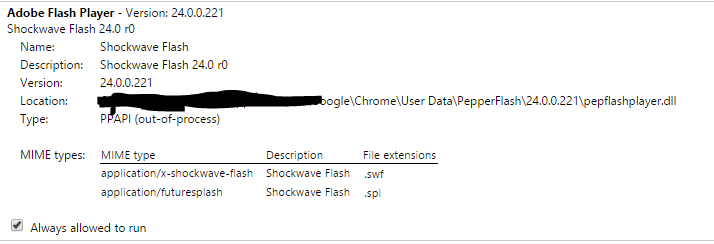
In Chrome 57 or higher go to chrome://settings/content , scroll down til the flash area and select always allowed to run

2) Go to Menu (3 dots) -> Settings -> Show advanced settings -> Privacy -> Content Settings -> Flash -> Manage Exceptions and add the Kongregate URL and select "Allow" under Behavior.

3) Finally, go to chrome://flags and enable "Run all Flash content when Flash setting is set to "allow"" and then restart Chrome.

Once you've managed those three steps, you've solved the puzzle! If you're still having trouble getting badges, buying Kreds, or otherwise interacting with Kongregate, please email support@kongregate.com.
Comments
0 comments
Please sign in to leave a comment.